
Sazlo, on your computer.
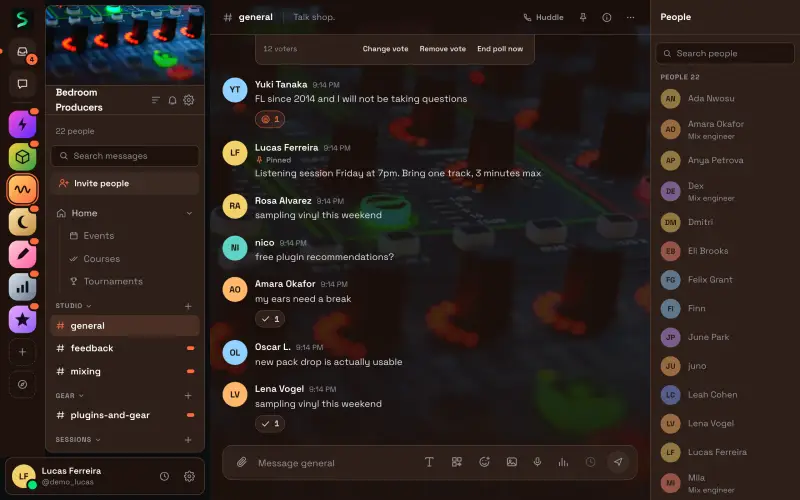
The Sazlo you know, plus hotkeys in any app, a tray, an overlay and system notifications. Or skip the install and open Sazlo in your browser.

 App Store in review
Version 0.1.2. Free, and it updates itself.
Every computer
Version 0.1.2 release notes- Your computer
macOS
macOS 11 or later, Apple silicon and Intel
Download for MacUniversal .dmg, 6 MB
First launch
Right click Sazlo in Applications and choose Open, or choose Open Anyway in System Settings, Privacy and Security.
- Your computer
Windows
Windows 10 and 11, 64-bit
Download for WindowsInstaller .exe, 2 MB
Also.msi3 MBFirst launch
If SmartScreen says it protected your PC, choose More info, then Run anyway.
- Your computer
Linux
64-bit, most distributions
Download for LinuxAppImage, 82 MB
First launch
Make the AppImage executable and run it, or install the .deb or .rpm package.
Phones
- App Store in review
The Android app is on Google Play. The iPhone app is awaiting App Store approval, and until then sazlo.app works in your phone's browser.
What the app adds
- Notifications and a badge
- System notifications for mentions, direct messages and calls, and an unread count on the dock or taskbar.
- Hotkeys anywhere
- Push to talk, mute and deafen while another app is in front.
- Tray and launch at login
- Mute and deafen from the tray, and start Sazlo with your computer.
- Overlay and game activity
- An in-game overlay that shows who is talking, and the game you are playing as your activity.
- Streamer mode
- Keep Sazlo out of screen captures and shared screens on macOS and Windows.
- Updates itself
- New versions install on their own, checked against Sazlo's signature.
Questions
Why does my computer ask before opening Sazlo?
The desktop builds are not code signed yet, so macOS and Windows ask once before the first launch. The steps under each download get you past it. Updates after that install without asking.
Is the desktop app different from sazlo.app?
It is the same Sazlo, with your account, spaces and settings. The app adds what a browser tab cannot do, like hotkeys in any app, the tray and the overlay.
Where are the iPhone and Android apps?
The Android app is on Google Play. The iPhone app is awaiting App Store approval, and until then sazlo.app works in your phone's browser.
Bring your people.
Sazlo runs in the browser at sazlo.app, as a desktop app for Mac, Windows and Linux, and on Android. Make a space, invite your group, or bring a community you already run somewhere else, history and all.
- App Store in review